
Category: Longform
You are viewing all posts from this category, beginning with the most recent.
🛜Set up QOS with EdgeOS (Ubiquiti)
Setting up QOS on a Ubiquiti router with EdgeOS is not very complicated and pretty straightforward. In this post I try to set forth the way to set this up. I will show two ways.
- A configuration with groups, which is slower but better manageable
- A configuration without groups, which is faster giving a higher throughput
Configuration with groups
This configuration with a group is nice if you want to easily add or remove nodes from QOS. You can do this by logging in to the webGUI of your Ubiquiti router and just conveniently add or remove a IP. In the script below that group is called “QOS_High_Prio_Nodes”. A default IP is added “192.168.130.1”.
The downside of this script is that because we are marking the traffic, the router gets pretty busy and so the throughput of the traffic goes significantly down.
-
Create an address group for high-priority nodes.
This group (QOS_High_Prio_Nodes) can be easily managed from the webGui. -
Mark traffic via a firewall rule
This marking makes it possible to use a group, as using a group directly is not possible. The downside is that the throughput is significantly lower than not marking the traffic. -
Define a traffic shaper policy for download traffic
Here you set the true bandwidth of your broadband connection with your ISP. -
Class 10: High priority for traffic to QOS_High_Prio_Nodes
-
Class 20: Lower priority for traffic from VLAN200 (192.168.200.0/24)
-
Class 30: Lower priority for traffic from VLAN120 (192.168.120.0/24)
In this example there are 3 classes set. All with their own bandwidth-quota and priority. -
Default Class: Other traffic receives default treatment.
All other traffic is shaped at the lowest priority.Make sure the sum of all the bandwidth does not excite 100%
-
Apply the policy to both interfaces.
Since I own a Ubiquiti Edgerouter ER-12 the default WAN port is eth9. Of course if your WAN is on a different port, adjust accordingly.
Script 1
configure

# 1. Create an address group for all high priority nodes
set firewall group address-group QOS_High_Prio_Nodes address 192.168.130.1
set firewall group address-group QOS_High_Prio_Nodes description "Address group for nodes with high priority"

# 2. Mark traffic via a firewall rule
set firewall modify MARK_QOS_High_Prio_Nodes rule 10 action modify
set firewall modify MARK_QOS_High_Prio_Nodes rule 10 modify mark 10
set firewall modify MARK_QOS_High_Prio_Nodes rule 10 source group address-group QOS_High_Prio_Nodes
set firewall modify MARK_QOS_High_Prio_Nodes rule 10 description "Mark traffic for QOS_High_Prio_Nodes"

# 3. Define a traffic shaper policy for download traffic
set traffic-policy shaper DOWNLOAD_POLICY bandwidth 910mbit
set traffic-policy shaper DOWNLOAD_POLICY description "QoS policy for download traffic, total bandwidth 910 Mbps"

# 4. Class 10: High priority for VLAN30 traffic (192.168.130.1/32)
set traffic-policy shaper DOWNLOAD_POLICY class 10 bandwidth 5%
set traffic-policy shaper DOWNLOAD_POLICY class 10 ceiling 100%
set traffic-policy shaper DOWNLOAD_POLICY class 10 priority 7
set traffic-policy shaper DOWNLOAD_POLICY class 10 queue-type fair-queue
set traffic-policy shaper DOWNLOAD_POLICY class 10 match VLAN30_QOS_HIGH_PRIORITY mark 10
set traffic-policy shaper DOWNLOAD_POLICY class 10 description "High priority (50% guaranteed) for PRIO nodes"

# 5. Class 20: Lower priority for VLAN20 traffic (192.168.20.0/24)
# If VLAN20 does not exist in your network, remove this class.
set traffic-policy shaper DOWNLOAD_POLICY class 20 bandwidth 20%
set traffic-policy shaper DOWNLOAD_POLICY class 20 ceiling 100%
set traffic-policy shaper DOWNLOAD_POLICY class 20 priority 4
set traffic-policy shaper DOWNLOAD_POLICY class 20 queue-type fair-queue
set traffic-policy shaper DOWNLOAD_POLICY class 20 match VLAN20_PRIORITY ip source address 192.168.120.0/24
set traffic-policy shaper DOWNLOAD_POLICY class 20 description "Lower priority (20% guaranteed) for VLAN20 traffic"

# 6. Class 30: Lower priority for VLAN178 traffic (192.168.178.0/24)
set traffic-policy shaper DOWNLOAD_POLICY class 30 bandwidth 65%
set traffic-policy shaper DOWNLOAD_POLICY class 30 ceiling 100%
set traffic-policy shaper DOWNLOAD_POLICY class 30 priority 3
set traffic-policy shaper DOWNLOAD_POLICY class 30 queue-type fair-queue
set traffic-policy shaper DOWNLOAD_POLICY class 30 match VLAN178_PRIORITY ip source address 192.168.200.0/24
set traffic-policy shaper DOWNLOAD_POLICY class 30 description "Lower priority (20% guaranteed) for VLAN178 traffic"

# 7. Default class: Other traffic gets standard treatment
set traffic-policy shaper DOWNLOAD_POLICY default bandwidth 10%
set traffic-policy shaper DOWNLOAD_POLICY default ceiling 100%
set traffic-policy shaper DOWNLOAD_POLICY default priority 1
set traffic-policy shaper DOWNLOAD_POLICY default queue-type fair-queue

# 8. Apply the policy to both interfaces:
# - eth9: Outbound traffic to the internet
set interfaces ethernet eth9 traffic-policy out DOWNLOAD_POLICY
set interfaces ethernet eth9 description "WAN interface with QoS policy applied to outbound traffic"

commit
save
exit
Configuration without groups, but a higher throughput
This configuration lacks groups, which would have given it the ability to be more manageable. More manageable in the way that you could add and remove modes (IP’s) to and from an address-group in the webGUI of your Ubiquiti router. This would have been very convenient. But more on that later.
The great benefit of dropping the convenience of the traffic marking is that you get the max possible throughput of the router.
-
Define a traffic shaping policy for download traffic
Here you set the true bandwidth of your broadband connection with your ISP. -
Class 10: High priority for VLAN30 traffic (192.168.130.1/32)
This now your node this the highest priority for QOS -
Class 20: Lower priority for VLAN120 traffic (192.168.120.0/24)
-
Class 30: Lower priority for VLAN140 traffic (192.168.140.0/24)
-
Default class: Other traffic gets standard treatment
All other traffic is shaped at the lowest priority.Make sure the sum of all the bandwidth does not excite 100%
-
Apply the policy to both interface eth9
Since I own a Ubiquiti Edgerouter ER-12 the default WAN port is eth9. Of course if your WAN is on a different port, adjust accordingly.
Script 2
configure

# 1. Define a traffic shaping policy for download traffic
set traffic-policy shaper DOWNLOAD_POLICY bandwidth 910mbit
set traffic-policy shaper DOWNLOAD_POLICY description "QoS policy for download traffic, total bandwidth 910 Mbps"

# 2. Class 10: High priority for (192.168.130.1/32)
set traffic-policy shaper DOWNLOAD_POLICY class 10 bandwidth 5%
set traffic-policy shaper DOWNLOAD_POLICY class 10 ceiling 100%
set traffic-policy shaper DOWNLOAD_POLICY class 10 priority 7
set traffic-policy shaper DOWNLOAD_POLICY class 10 queue-type fair-queue
set traffic-policy shaper DOWNLOAD_POLICY class 10 match VLAN30_QOS_HIGH_PRIORITY ip source address 192.168.130.1/32
set traffic-policy shaper DOWNLOAD_POLICY class 10 description "High priority (5% guaranteed) for TV"

# 3. Class 20: Lower priority for VLAN120 traffic (192.168.120.0/24)
# If VLAN120 does not exist in your network, remove this class.
set traffic-policy shaper DOWNLOAD_POLICY class 20 bandwidth 20%
set traffic-policy shaper DOWNLOAD_POLICY class 20 ceiling 100%
set traffic-policy shaper DOWNLOAD_POLICY class 20 priority 4
set traffic-policy shaper DOWNLOAD_POLICY class 20 queue-type fair-queue
set traffic-policy shaper DOWNLOAD_POLICY class 20 match VLAN20_PRIORITY ip source address 192.168.120.0/24
set traffic-policy shaper DOWNLOAD_POLICY class 20 description "Lower priority (20% guaranteed) for VLAN120 traffic"

# 4.Class 30: Lower priority for VLAN140 traffic (192.168.140.0/24)
# If VLAN140 does not exist in your network, remove this class.
set traffic-policy shaper DOWNLOAD_POLICY class 30 bandwidth 65%
set traffic-policy shaper DOWNLOAD_POLICY class 30 ceiling 100%
set traffic-policy shaper DOWNLOAD_POLICY class 30 priority 3
set traffic-policy shaper DOWNLOAD_POLICY class 30 queue-type fair-queue
set traffic-policy shaper DOWNLOAD_POLICY class 30 match VLAN178_PRIORITY ip source address 192.168.140.0/24
set traffic-policy shaper DOWNLOAD_POLICY class 30 description "Lower priority (65% guaranteed) for VLAN140 traffic"

# 5. Default class: Other traffic gets standard treatment
set traffic-policy shaper DOWNLOAD_POLICY default bandwidth 10%
set traffic-policy shaper DOWNLOAD_POLICY default ceiling 100%
set traffic-policy shaper DOWNLOAD_POLICY default priority 1
set traffic-policy shaper DOWNLOAD_POLICY default queue-type fair-queue

# 6. Apply the policy to both interfaces:
# - eth9: outbound internet-facing interface
set interfaces ethernet eth9 traffic-policy out DOWNLOAD_POLICY
set interfaces ethernet eth9 description "WAN interface with QoS policy applied to outbound traffic"

commit
save
exit
📝🎮📺
📺Getting your Emby library scanned for new content in four ways.
Running Emby en Radarr/Sonarr on different servers or in different container can be a pain in the ass to get your content scanned.
But it is much easier than you think if you know what’s going on inside the services. The TL;DR is keep your content path the same in EMBY and in Sonarr/Radarr. If you don’t keep them the same, you run into trouble.
First, I show two options when you can’t keep the paths the same (say you have a linux node running EMBY and a Windows (don’t mention it) node for Sonarr/Radarr. It’s obvious the paths will never be the same, as Linux will give you a PATH like below.
/home/user/video/movies/Your Old Movie (1921)/Your.Old.Movie.1921.Remux-2160p.mkv
Where Windows (sh*t have to mention it again) will give you a path
D:\data\video\movies\Your Old Movie (1921)\Your.Old.Movie.1921.Remux-2160p.mkv
The slashed only (Linux forward slash / and Windows a backslash \ ) already makes this a problem.
Then I will show you two options if you can the PATHs the same. This can be done when:
- You run all your software on one node, therefor the content PATHs in EMBY en Sonarr/Radarr will be the same (Obviously)
- When you run multiple nodes of the SAME OS and run the services (EMBY, Sonarr, Radarr) in DOCKER, and therefore you can keep the PATHs the same inside your docker containers.
- When you run multiple nodes of THE SAME OS (for EMBY, Sonarr and Radarr) and store the content on the same network share (a third node) via Radarr/Sonarr and EMBY will scan the content on that same third node.
Option 1 different paths (you can’t keep the paths the same)
This method triggers a complete library scan. This work fine but is suboptimal. When your library is large, or you frequently trigger the library scan, it will have an impact on EMBY.
curl -X POST "${EMBY_HOST}/Emby/Library/Refresh?api_key=${EMBY_APIKEY}" --data ""
Where:
EMBY_HOST = http:/192.168.1.1:0896 or https://www.yourdoamin.com:443

EMBY_APIKEY = XXXXXXYYYYYZZZZZZ
Option 2 different paths (you can’t keep the paths the same)
This method tiggers a scan for a certain library in your collection (EMBY_PARENT_ID). The advance to the pervious option is that you only trigger one collection in the library. The downside is you have to fiddle around with the EMBY_PARENT_ID. These can be obtained from the URL when you open the collection in EMBY.
curl -X POST "${EMBY_URL}/emby/Items/${EMBY_PARENT_ID}/Refresh?Recursive=true&MetadataRefreshMode=Default&ImageRefreshMode=Default&ReplaceAllMetadata=false&ReplaceAllImages=false&api_key=${EMBY_APIKEY}" -H "accept: */*" -d “”
Where:
EMBY_HOST = http:/192.168.1.1:0896 or https://www.yourdoamin.com:443

EMBY_APIKEY = XXXXXXYYYYYZZZZZZ

EMBY_PARENT_ID = 12
Option 3 Same paths (you can keep the path in *arr equal to the path in EMBY)
This is the simplest to configure the default trigger in Sonarr/Radarr
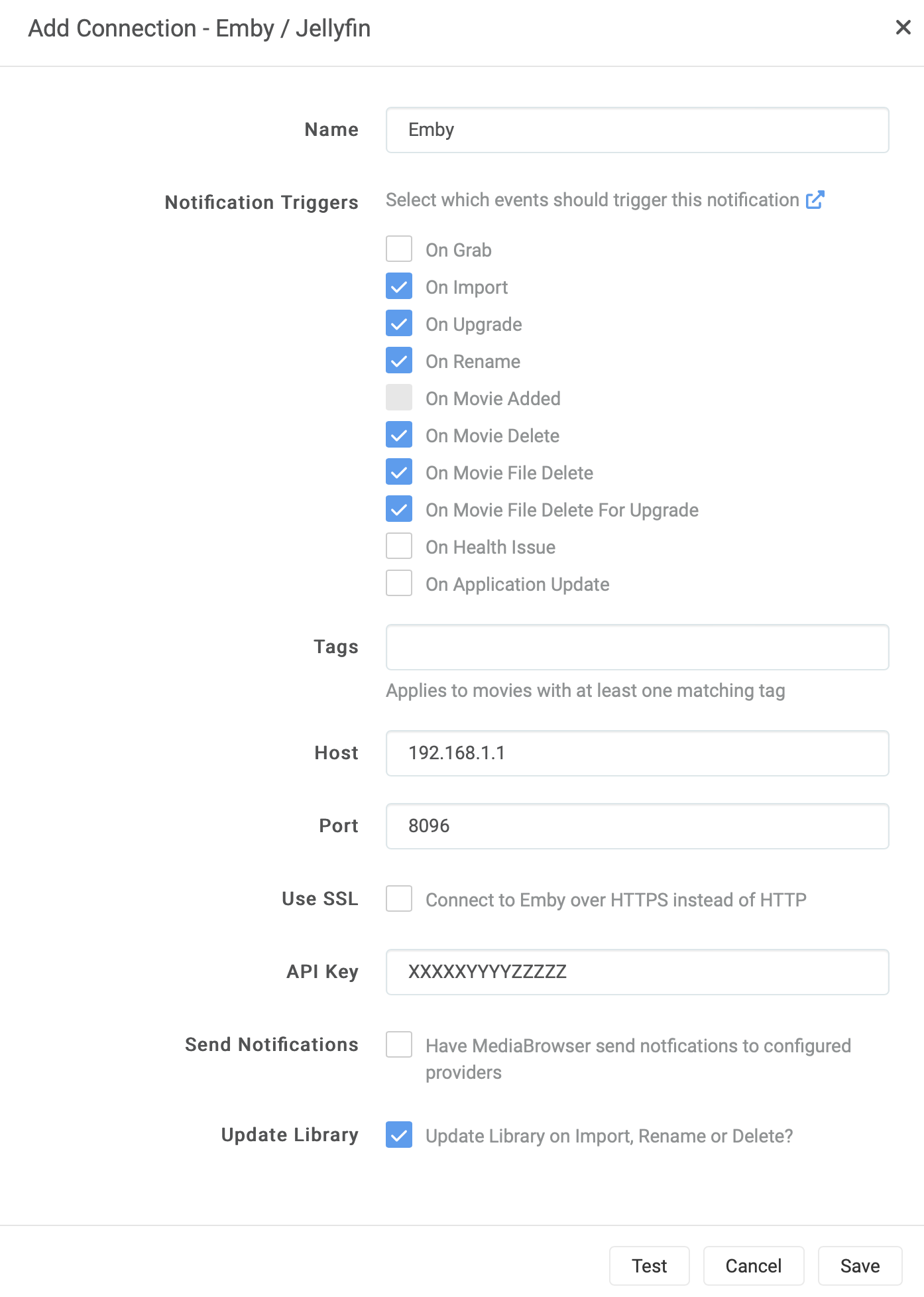
Option 4 Same paths (you can keep the path in *arr equal to the path in EMBY)
This method tiggers a scan for a certain library in your collection. The advance to the pervious option is that you add your own logic to the scan. The other advance is that you can fill-out Path and UpdateType from the environment variables in Linux (or your container)
curl -X POST "${EMBY_URL}/emby/Library/Media/Updated?api_key=${EMBY_APIKEY}" -H "accept: */*" -H "Content-Type: application/json" -d "{\"Updates\":[{\"Path\":\"${Path}\",\"UpdateType\":\"${UpdateType}\"}]}"
Where:
EMBY_HOST = http:/192.168.1.1:0896 or https://www.yourdoamin.com:443

EMBY_APIKEY = XXXXXXYYYYYZZZZZZ

Path = /movies/Old Movie, The (1921)/The.Old.Movie.1921.Bluray-2160p.mkv

UpdateType = [ Created | Modified | Deleted ] (optional)
Here is an example script I use for Radarr and Sonarr. I like separate scripts for Radarr and Sonarr, but you easily merge them and create one script for both Radarr and Sonarr.
Radarr
#!/bin/bash

NOW=$(date +"%d-%m-%Y %H:%M")
LOG_FILE="/logging/radarr/emby_scan.txt"
TMP_FILE="/tmp/tmp_emby_radarr.txt"
DL_FILE="/scripts/dl_radarr.txt"
DEL_FILE="/scripts/del_radarr.txt"
REN_FILE="/scripts/ren_radarr.txt"
EMBY_URL="https://emby.yourdomain.com"
EMBY_RADARR_APIKEY="xxxyyyyyzzz"

if [ "${radarr_eventtype}" != "" ]; then
  if [ "${radarr_eventtype}" == "ApplicationUpdate" ] || [ "${radarr_eventtype}" == "MovieAdded" ] || [ "${radarr_eventtype}" == "Grab" ] || [ "${radarr_eventtype}" == "HealthIssue" ] || [ "${radarr_eventtype}" == "Test" ]; then
    (echo "${NOW} - [Emby Library Scan] Radarr Event Type is ${radarr_eventtype}, exiting."; cat ${LOG_FILE}) > ${TMP_FILE}; mv ${TMP_FILE} ${LOG_FILE}
    exit
  fi

  (echo "${NOW} - [Emby Library Scan] Radarr Event Type is ${radarr_eventtype}, updating Emby Library for ${radarr_movie_title}."; cat ${LOG_FILE}) > ${TMP_FILE}; mv ${TMP_FILE} ${LOG_FILE}

  if [ "$radarr_eventtype" == "Download" ]; then
    echo "${radarr_movie_title} (${radarr_movie_year})" >> ${DL_FILE}
    UpdateType="Created"
    Path="${radarr_movie_path}"
  fi

  if [ "${radarr_eventtype}" == "MovieDelete" ]; then
    echo "${radarr_movie_title} (${radarr_movie_year})" >> ${DEL_FILE}
    UpdateType="Deleted"
    Path="${radarr_movie_path}"
  fi

  if [ "$radarr_eventtype" == "Rename" ]; then
    echo "${radarr_movie_title} (${radarr_movie_year})" >> ${REN_FILE}
    UpdateType="Modified"
    Path="${radarr_movie_path}"
  fi

  curl -X POST "${EMBY_URL}/emby/Library/Media/Updated?api_key=${EMBY_RADARR_APIKEY}" -H "accept: */*" -H "Content-Type: application/json" -d "{\"Updates\":[{\"Path\":\"${Path}\",\"UpdateType\":\"${UpdateType}\"}]}"

else
  (echo "${NOW} - [Emby Library Scan] Radarr Event Type is empty."; cat ${LOG_FILE}) > ${TMP_FILE}; mv ${TMP_FILE} ${LOG_FILE}

fi

# write a status file with date of last run.  Helps troubleshoot that cron task is running.
echo "$(basename $0) last run was at $(date)" > /logging/radarr/_$(basename $0)_lastrun.txt
Sonarr
#!/bin/bash

NOW=$(date +"%d-%m-%Y %H:%M")
LOG_FILE="/logging/sonarr/emby_scan.txt"
TMP_FILE="/tmp/tmp_emby_sonarr.txt"
DL_FILE="/scripts/dl_sonarr.txt"
DEL_FILE="/scripts/del_sonarr.txt"
REN_FILE="/scripts/ren_sonarr.txt"
EMBY_URL="https://emby.yourdomain.com"
EMBY_SONARR_APIKEY="zzzzzyyyyyxxxxx"

if [ "${sonarr_eventtype}" != "" ]; then
  if [ "${sonarr_eventtype}" == "ApplicationUpdate" ] || [ "${sonarr_eventtype}" == "Grab" ] || [ "${sonarr_eventtype}" == "HealthIssue" ] || [ "${sonarr_eventtype}" == "Test" ]; then
    (echo "${NOW} - [Emby Library Scan] Sonarr Event Type is ${sonarr_eventtype}, exiting."; cat ${LOG_FILE}) > ${TMP_FILE}; mv ${TMP_FILE} ${LOG_FILE}
    exit
  fi

  (echo "${NOW} - [Emby Library Scan] Sonarr Event Type is ${sonarr_eventtype}, updating Emby Library for ${sonarr_series_title} - ${sonarr_episodefile_episodetitles}."; cat ${LOG_FILE}) > ${TMP_FILE}; mv ${TMP_FILE} ${LOG_FILE}

  if [ "$sonarr_eventtype" == "Download" ];  then
    echo "${sonarr_series_title} - ${sonarr_episodefile_episodetitles}" >> ${DL_FILE}
    UpdateType="Created"
    Path="${sonarr_episodefile_path}"
  fi

  if [ "$sonarr_eventtype" == "EpisodeFileDelete" ];  then
    echo "${sonarr_series_title} - ${sonarr_episodefile_episodetitles}" >> ${DEL_FILE}
    UpdateType="Deleted"
    Path="${sonarr_episodefile_path}"
  fi

  if [ "$sonarr_eventtype" == "SeriesDelete" ];  then
    echo "${sonarr_series_title}" >> ${DEL_FILE}
    UpdateType="Deleted"
    Path="${sonarr_series_path}"
  fi

  if [ "$sonarr_eventtype" == "Rename" ]; then
    echo "${sonarr_series_title}" >> ${REN_FILE}
    UpdateType="Modified"
    Path="${sonarr_series_path}"
  fi

  curl -X POST "${EMBY_URL}/emby/Library/Media/Updated?api_key=${EMBY_SONARR_APIKEY}" -H "accept: */*" -H "Content-Type: application/json" -d "{\"Updates\":[{\"Path\":\"${Path}\",\"UpdateType\":\"${UpdateType}\"}]}"

else
  (echo "${NOW} - [Emby Library Scan] Sonarr Event Type is empty."; cat ${LOG_FILE}) > ${TMP_FILE}; mv ${TMP_FILE} ${LOG_FILE}

fi

# write a status file with date of last run.  Helps troubleshoot that cron task is running.
echo "$(basename $0) last run was at $(date)" > /logging/sonarr/_$(basename $0)_lastrun.txt
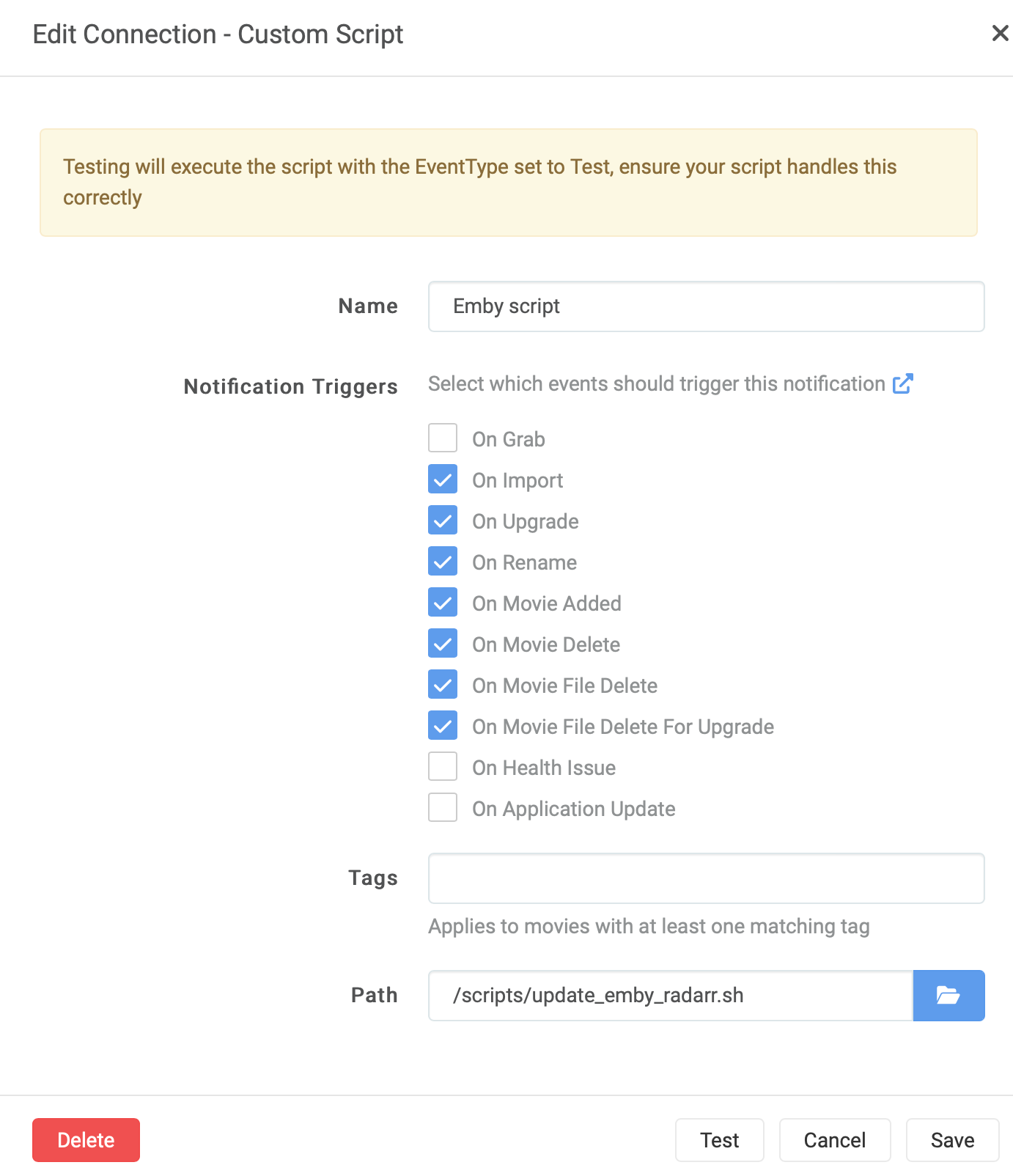
These scripts also maintain lists of the content names, so they can be used in reporting or notification. You can, of course, strip these.
I run these scripts in the Connect section in Radarr/Sonarr.
📺🎥📽️
👨🏽💻Choosing your Python editing weapon
Well a few days passed since I got a micro:bit… Started out with MakeCode to play around with it, but the goal was python. For this I switched to mu-editor at first. A great editor… I like the check en tidy function. But I missed the simulator I had in MakeCode. Of course you can (and must) run your code on the physical micro:bit but a simulator is great for testing and trying little pieces of code. But I accepted the fact that mu-editor and python coding didn’t had a simulator.
Then I picked up a “old” tool from the shed on my Macbook, Visual Studio code. I started to use it again to edit shell scripts because brackets announced to stop service this coming summer. Why not pop in python script in there. This editor offered me to install python extensions. And I started exploring the nets of inter what was possible with VScode.
And I came across Device Simulator Express, an extension for VScode. Just the tool I needed to have my micro:bit simulated in VScode. Just open the extensions tab in VScode and look for “Device Simulator Express” and install the beast.
There is one pitfall in installing this extension. After installing the extension en pressing shift-command-p to open de command-pane : enter “device simulator express : New file”. This will install some more dependencies and you might run in the problem that you get a message “Device Simulator Express: Install Extension Dependencies”. Telling you the install failed.
When pressing shift-command-p and giving the command “Device Simulator Express: Install Extension Dependencies” as instructed, you will find that they will never get installed and you end up with a reoccurring error all the time. This seems to have something to do with python 3.9. You can fix this doing the following:
On Python 3.9:
Edit the file “users<user>.vscodeextensionsms-python.devicesimulatorexpress-2020.0.36321outrequirements.txt” and changed the line
Pillow==7.0.0
to
Pillow==8.1.0
Restart VScode and press shift-command-p and give the command “Device Simulator Express: Install Extension Dependencies” again. Now the dependencies get installed nicely.
What I extra installed was a linter. Shift-command-x : this opens the extensions. Enter “flake8” in the search field. Sometimes you need to restart VS-code to force install-popup for flake8. Now you have error-highting in the editor as you go.
And what I also installed was code formatter for python. Shift-command-x : this opens the extensions. Enter “autopep8” in the search field. Press shift-option-f: to start the formatter when your cursor is on a line that needs formatting. This little baby formats your code. Cut the extra white-space. Correct the indenting. All kind of stuff.
I stopped using Windows at home for more than 11 years and left everything from Microsoft alone, switching to Apple and got the complete fruitbasket with all it’s products. But VScode has surprised me and it’s gonna stay for python editing……
📝🖋️
👨🏽💻Starbit Commander II
Well, on my quest to learn python, I poked and peeked around at the web of inters. And came across some nice sites about the micro:bits, projects and coding.
One site inspired me to create a python version of Starbit Commander. This site is home to many projects of Derek Graham. Next to Micro:bit bits, he has many other things too on his site.
But why remake of Starbit Commander? Derek has this pleasant example of “Tiny Astroids”, which resembled a lot like Starbit Commander. And he created it in Python… so. Mine Starbit Commander should get a python version too… In this little gem from Derek, he created a really, really pleasant piece of code that animated an explosion on this 5×5 LED display. I loved it. And although I wanted to create Starbit from scratch in OO, I really wanted to adopt this pleasant little tiny explosion. So, I contacted Derek via Twitter, asked if he agreed to me use his explosion-code. We had a short but very nice chat on Twitter, and he agreed for the code to be reuse in Starbit Commander. Thanks, Derek!
Well, I wanted to test and learn more python and also OO in python. So, I decided to try to make Starbit Commander in an OO-style. I have no experience in this, but I think (as far as I can tell) this is an OO-version of the game now. Derek mentioned on micro:bit V1’s coding OO would let you ran into out of memory errors. I haven’t seen them on the microbit V2 with Starbit Commander. (Now I’m worried if I did a proper OO-coding style ;-0)
I differed a bit from the original Starbit code. While de MakeCode version has power-ups to collect, in this python-version I decided to skip that and make the astroid field a bit more challenging by starting slow and easy and ending fast and astroid-crowded. Giving you more and more bonus score along the way you go.
This code can be found here. And watch that explosion… Thanks again, Derek Graham!
👨🏽💻Micro:bit Fireflies
My first attempt to write some (micro)Python code. Fireflies. This leds simulate fireflies in the air…
By the way, I found that display.get_pixel does not return the correct value for the brightness of a LED on a micro:bit. I created this function to correct this behavior in the code (fixPixelBug).
from microbit import *
import random

# This fucntions fixes the "display.get_pixel" bug.
# a full bright led does not return a "9" but a "255".
def fixPixelBug(brightness):
    if brightness == 4:
        return 3
    elif brightness == 8:
        return 4
    elif brightness == 16:
        return 5
    elif brightness == 32:
        return 6
    elif brightness == 64:
        return 7
    elif brightness == 128:
        return 8
    elif brightness == 255:
        return 9
    else:
        return brightness


while True:
    sleep(50)

    brightness = random.randint(1, 9)
    x = random.randint(0, 4)
    y = random.randint(0, 4)
    if display.get_pixel(x, y) == 0:
        display.set_pixel(x, y, brightness)

    for fireflies in range(0, 5):
        x = random.randint(0, 4)
        y = random.randint(0, 4)

        if fixPixelBug(display.get_pixel(x, y)) > 0:
            display.set_pixel(x, y, fixPixelBug(display.get_pixel(x, y)) - 1)
Code here 📝✏️
📟How do you find the RSS Feed of a website (if it exists)
Summary
This article describes various methods to find RSS feeds on websites. For WordPress, you append /feed to the URL to find the RSS feed, while for Tumblr and Medium, /rss and /feed/ are added respectively. For a Blogger site, the string at the end of the URL is longer, feeds/posts/default. YouTube channel pages also act as RSS feeds. Additionally, you can extract the RSS feed from the page source by searching for ‘Application/rss’ or ‘Atom’ in the source code. Safari users can use an app that adds a ready-to-use RSS button to their browser. Lastly, ‘educated guessing’ is a technique where you add /feed/ or /rss/ to the domain in the hope that one of them leads you to the correct feed.
Comments
Method 2 is the most practical in practice.
Content
Method 1 – Investigating the CMS Used
- To access a WordPress RSS feed, simply append /feed to the site’s URL. So, if the WordPress site’s URL is, for example, example.com, to find the RSS feed, you would add /feed to obtain example.com/feed. When used in an RSS reader, this URL would allow you to view the site’s content in feed form.
- In the case of sites hosted on Tumblr, the method is slightly different but still very straightforward. You need to add /rss to the end of the Tumblr site’s URL. So, if the Tumblr address is example.tumblr.com, the RSS feed can be found at example.tumblr.com/rss.
- For blogs hosted on Blogger, you need to add a slightly longer string to the end of the URL: feeds/posts/default. So, for a Blogger site at the address example.blogspot.com, the RSS feed can be found at example.blogspot.com/feeds/posts/default.
- If you want to find an RSS feed for a publication hosted on Medium, you have to add /feed/ before the publication’s name in the URL. If the publication’s address on Medium is medium.com/example-site, the URL for the RSS feed would change to medium.com/feed/example-site to view it in your RSS reader.
- YouTube channel pages also have a built-in functionality to act as RSS feeds. As such, you simply need to copy the channel’s URL and paste it into your RSS reader. Additionally, if you are already subscribed to various channels on YouTube, you can find an OPML file with all your subscriptions here, which you can then import into your RSS reader for easy access to all subscribed channels.
Method 2 – Extract RSS Feed from Page Source
To find the RSS or Atom feeds of a specific website, start by opening the website in your browser. Then, right-click anywhere on the page—it doesn’t matter where, as long as it’s not a link or image.
In the context menu that appears, choose the option “View Page Source” or something similar; the exact text may vary depending on the browser you are using. This will show you the page source, which is the underlying HTML and CSS skeleton that determines how the page looks and functions.
Once in the page source, use your browser’s search function (often accessible via Ctrl + F or Command + F on a Mac) to search for the term “Application/rss”. This is the most common way websites indicate their RSS feeds.
If you don’t get any results searching for “Application/rss,” try searching for “Atom”. Atom is an alternative feed standard that some sites may use instead of or in addition to RSS.
If you find any of these terms in the page source, follow the corresponding URL to access the feed.
Method 3 – Browser Extensions
If you use Safari, there is a user-friendly solution you can apply to receive RSS feeds, which is the RSS Button for the Safari app. This feature is designed with simplicity and ease of use in mind. It adds an RSS button to your Safari browser, allowing you quick and easy access to RSS feeds of websites you visit. The only caution is that this convenient button requires a small fee of $0.99. While this is a minimal cost, some users may object to paying for such functionality.
Method 4 – The Principle of Educated Guessing
This is an interesting method, particularly intended for cases where you want to find the RSS feed for a particular website, but it is not clearly indicated on the site itself. In such circumstances, “Educated Guessing” is helpful.
As an illustrative example, let’s take example.com/. Suppose you would like to find the RSS feed for this website, but you cannot find it in the usual sections of the website (such as the footer or sidebar). In such a situation, you can resort to educated guessing. This means trying out some obvious URL paths in the hope that one of them leads you to the correct feed.
Start by appending ‘/feed/’ after the domain. So, in our example, you would try navigating to example.com/feed/. If this doesn’t work, you can try another popular URL structure, such as ‘/rss/’. This means navigating to example.com/rss/.
This is, of course, not an exact science, and there is no guarantee that any of these guesses will lead you to the desired RSS feed. However, in practice, you will find that many websites follow these general URL structures for their feeds, making this a valuable technique to try. It is undoubtedly a quick and simple method to attempt to find the RSS feed if you are unable to locate it directly on the website.
📝✏️
📝How I brought order in the chaos
Summary
I have been exploring different methods to enhance my productivity and note-taking system. Additionally, I am striving to establish organization within my personal archives stored on my Synology device. During my research, I came across the following methodologies: Johnny Decimal, Zettelkasten, PARA and the Build A Second Brain approach.
My objective is to integrate these four methods in a way that enables me to:
-
Effectively store, retrieve, and manage my notes in an orderly manner.
-
Establish a systematic approach for storing and retrieving personal documents on my Synology device.
-
Implement a coherent structure across all the applications I utilize and require.
By combining these methodologies, I aim to streamline my note-taking and document management processes while maintaining a consistent organizational framework across various applications.
Contents
PARA (Projects, Areas, Resources, Archive)
Tiago Forte is a prominent productivity expert known for developing the PARA framework, which stands for Projects, Areas, Resources, and Archives. The PARA method is designed to help individuals organize and optimize their digital information and tasks. It involves categorizing information based on project-specific tasks, broader areas of responsibility, essential resources, and archival items. The PARA methodology aims to improve focus, efficiency, and clarity in managing personal and professional workflows.
On his website mentioned above, you find all the info you need, there is an ebook too on the matter.
As I am a Dutch guy, I took the Dutch translation for the PARA acronym
- Projecten
- Aandachtsgebieden
- Redmiddelen
- Archief
Within the folder “Projects” and “Areas” I created the 10 most common Areas of Attention.
- Health and well-being: This includes physical health, mental health, fitness, nutrition, and self-care practices.
- Family and relationships: This area includes family members, friends, romantic relationships, and social interactions that are important to you.
- Career and work: This encompasses your profession, career development, work goals, and professional achievements.
- Finances: Managing your finances, including budgeting, saving, investing, and debt repayment.
- Personal growth and development: This includes pursuing new skills, knowledge, and personal growth, as well as setting goals for self-improvement.
- Leisure and hobbies: Activities that provide you with pleasure and relaxation, such as hobbies, sports, arts, and other recreational pursuits.
- Living environment: Organizing and caring for your home, living space, and personal belongings.
- Community involvement: Volunteer work, charity work, or other activities that contribute to your community or society as a whole.
- Personal values and spirituality: Exploring and cultivating your personal values, beliefs, and spiritual growth.
- Time management and productivity: Developing effective time management and productivity habits to achieve your goals.
I try to fit my Projects and my Interests in those 10 areas.
For “Resources” I have not some a strict list of areas. This more fluid. These are an area that build over time.
For “Archive”, this is your “freezer” of information. Here is information that you don’t need anymore, but can be de-frosted when needed.
Johnny Decimal (JD)
Johnny.Decimal is a personal productivity system created by John Poelstra. It is based on the idea of organizing and categorizing information using a numeric hierarchy. Each level in the hierarchy represents a different category, and items are assigned unique numbers based on their location within the hierarchy. The system is designed to help individuals manage their digital and physical information effectively and improve their productivity.
On his website (mentioned above) you will find a detailed description of how JD works and can be implemented in your folder structure across your apps.
Fusing PARA and JD
If we fusing these two together (JD and PARA) I came up with something like this:
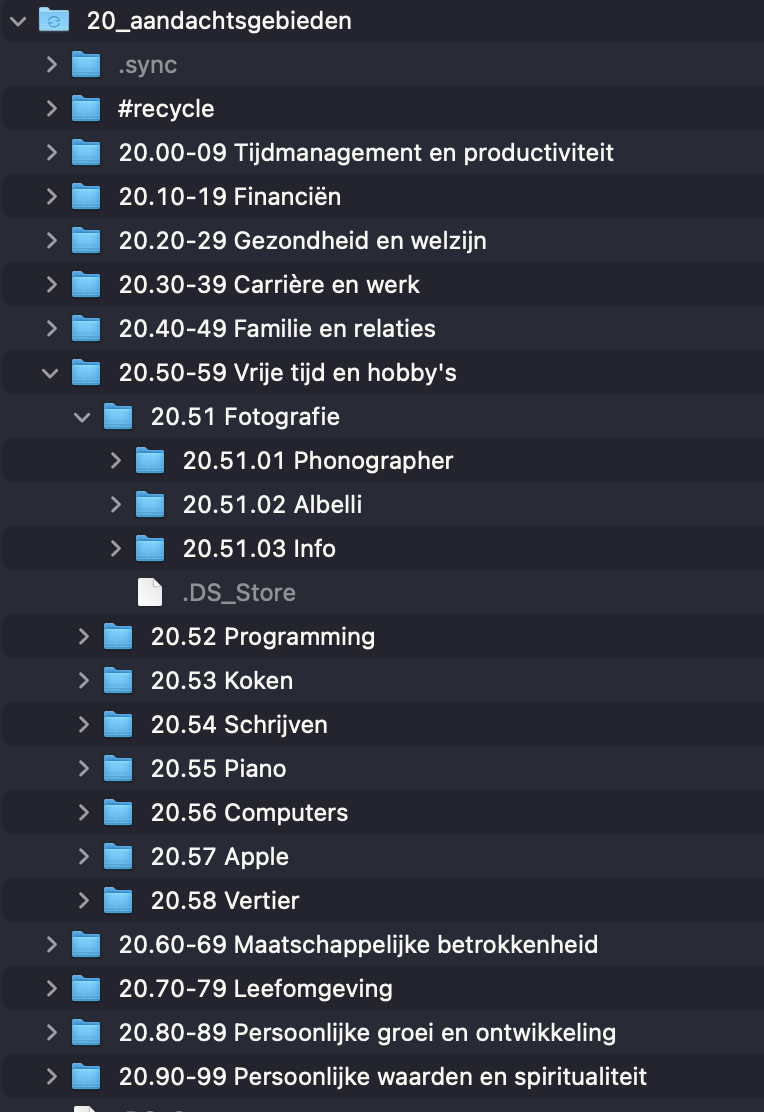
It’s all in Dutch but you get the picture.
I made 4 “root” folder
- 10_Projects
- 20_Areas
- 30_Resouces
- 40_Archives
The 20_Areas (or in Dutch 20_Aandachtsgebieden) is wat you see in the image as an example. From 20.00-09 till 20.90-99 you have your 10 MAIN Areas.
As I open here the Area “20.50-59 Leisure and hobbies” (or in Dutch 20.50-59 Vrije tijd en hobby’s) you can see I summed up all my hobbies in the subfolders.
- 20.51 Fotografie
- 20.52 Programming
- 20.53 Koken
- 20.54 Schrijven
- 20.55 Piano
- 20.56 Computers
- 20.57 Apple
- 20.58 Vertier
And within “20.51 Photography” I have al the individual items I care about in Photography (for now).
- 20.51.01 Phonographer
- 20.51.02 Albelli
- 20.51.03 Info
Can I see how the Johnny.Decimal Numbers all nicely lock in place. The advance is that if you share the folder structure with someone or you want to refer to a item in the structure you can simple say:
“Hey, look in 20.51.02 Albelli”
And that person (or yourself from a note), will know the PATH to that location without having to tell them:
“Goto /Users/marco/Resilio/20_aandachtsgebieden/20.50-59 Vrije tijd en hobby’s/20.51 Fotografie/20.51.02 Albelli”
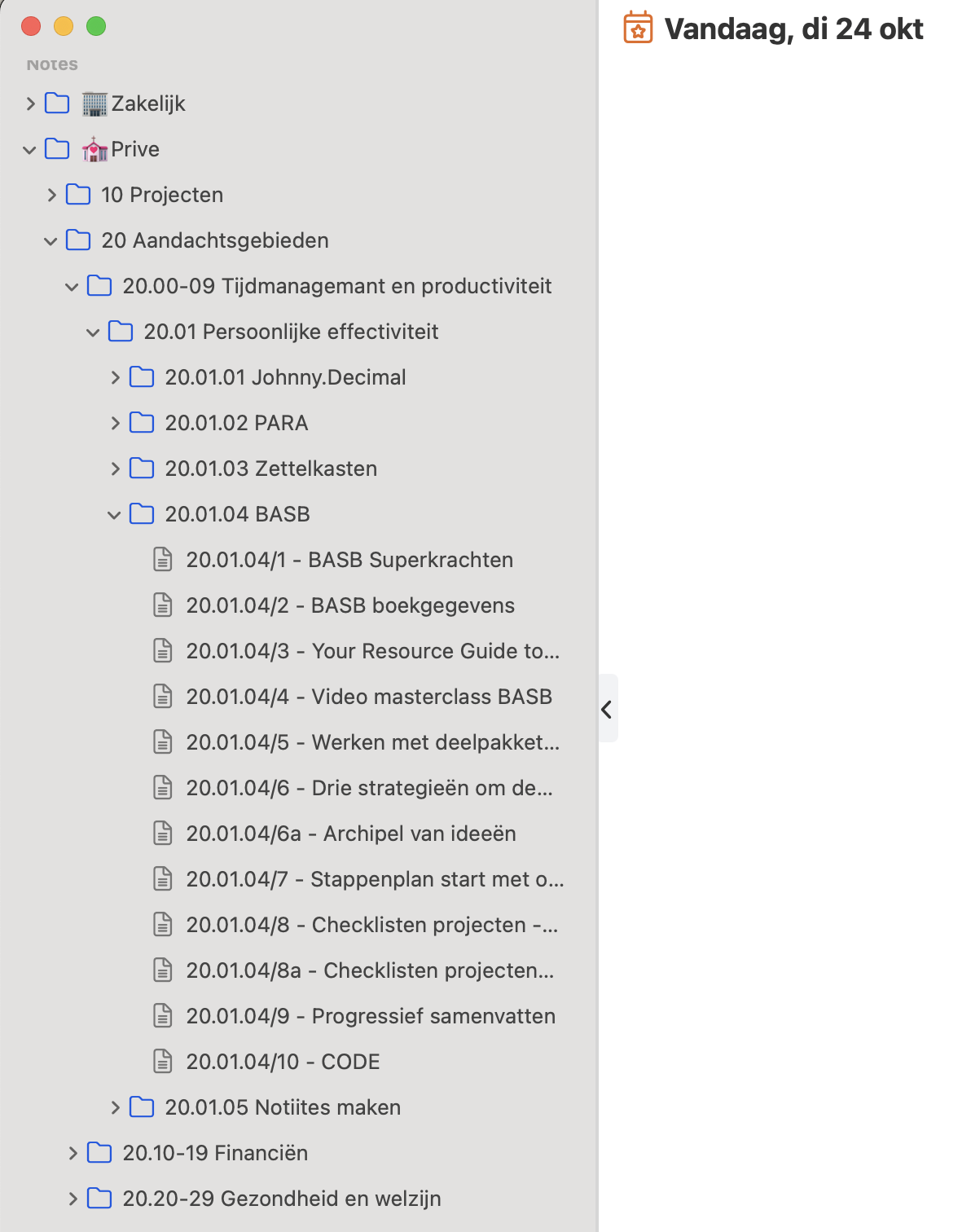
They exactly where to find this folder and it’s content. It’s all locked in side those numbers. Easi-Peasi! And you can do this in apps too. Say for instance in Things3 or like in the image blow in an app called Noteplan3 where I keep all my text-notes for stuff I find interesting.
🛜Blocking (or Allowing) whole Countries or a Provider or a Network with your Ubiquiti Edgerouter
I recently picked up a nice second hand Ubiquiti Edgerouter X from Marktplaats, which is the Dutch Craigslist. I wanted to play with a firewall in my network. This quickly became a complete rebuild of the network with multiple Vlans in my house. Which was enjoyable because exploring and learning is always a good thing.
This learning also counts for the firewall in the Edgerouter (which runs EdgeOS). I had some experience with firewalls in a very far past with a product called Checkpoint Firewall-1. I am unsure if it still exists. The company Checkpoint still does, though.
Playing around with the firewall wasn’t very hard. Of course, you need to learn the interface and the possibilities of the Firewall. I checked three videos on YouTube to get a head start. This video jumpstarted the head start for me.
As I progressed and got all the firewall rules in place as I wanted them, I really wanted to block off certain countries to be able to reach my webserver, which is behind a nginx reverse-proxy. The Ubiquiti doesn’t have preloaded sets of country networks. And I would rather not add all the networks used by a country manually. This is a daunting task. If I check for my country for example, there are 5999 networks (date:2024-01-18). This is impossible. So this must be done smarter.
Adding a complete country to a network-group in EdgeOS
For this solution, we lean heavily on te website http://www.ipdeny.com/ with the following script I wrote.
I saved this script on the Edgerouter in my $HOME directory with the following name: create_networkgroup_countrycode.sh
#!/bin/sh

# Name: create_networkgroup_asn.sh
# Coder: Marco Janssen (mastodon [@marc0janssen@mastodon.online](https://micro.blog/marc0janssen@mastodon.online))
# date: 2024-01-17 21:30:00
# update: 2024-01-31 21:39:00

if [ $# -eq 0 ]; then
	echo "No parameters provided. Provide a countrycode. Example nl or de"
else
	countrycode="$1"
	NOW=$(date +"%Y%m%d")

	echo "*** Downloading networkaddress blocks for countrycode $countrycode"
	curl "http://www.ipdeny.com/ipblocks/data/countries/$countrycode.zone" -o "./$countrycode.zone" -s

	echo "*** Writing networkgroup script"
	echo "delete firewall group network-group $countrycode.zone" > "./networkgroup-$countrycode.$NOW.sh"
	echo "set firewall group network-group $countrycode.zone description \"All networks $countrycode\" on $NOW" >> "./networkgroup-$countrycode.$NOW.sh"
	sed -e "s/^/set firewall group network-group $countrycode.zone network /" "./$countrycode.zone" >> "./networkgroup-$countrycode.$NOW.sh"
	cp "./networkgroup-$countrycode.$NOW.sh" nwgs.sh

	echo "*** Archiving zone-list"
	mv "$countrycode.zone" "$countrycode.zone.$NOW"

	echo
	echo "Now execute the following commands on the prompt of your Edgerouter"
	echo
	echo "configure"
	echo ". ./nwgs.sh"
	echo "commit"
	echo "save"
	echo "exit"
fi
What will this script do?
- It will check if you give it a parameter with a single country code. For example, nl or dk or de.
- Then it will try to download the network address blocks for the country-code and save it in a file. For The Netherlands (if you give it country-code nl) it will create a file called “nl.zone”.
- Then it will try to write a script for you which creates a network group in the Edgerouter. The file will be called “networkgroup-nl.<date>.sh (if you give it country-code nl).
- The script which is generated in step 3 will be copied to a shorter name “nwgs.sh” for your convenience. You can archive the longer one in step 3 and use the shorter one in this step.
- The zone list used in step 3 will also be archiving for you in a format “nl.zone.<date>” (if you give it country-code nl).
- Finally, you get further instructions to use the script and create the network-group.
Running the script
-
Get this script on your Edgerouter (ssh, scp, sftp) and place it in a directory of your likings. I place it in my $HOME on the router.
-
Name the script “create_networkgroup_countrycode.sh”
-
Make sure the script is executable:
chmod +x ./create_networkgroup_countrycode.sh -
Run the script (in this example for The Netherlands, i.e., nl):
./create_networkgroup_countrycode.sh nl -
Execute the following commands after the script has run.
configure . ./nwgs.sh commit save exit
A note of warning
For The Netherlands alone it will add 5999 networks to your Edgerouter. (Date: 2024-01-18). To run the generated network group script with the above command . ./nwgs.sh will take you some 18 minutes on the router. The following step commit will take you another 9 minutes on the router. If you now open your Edgerouter GUI, you will see the steps created a network-group called “nl.zone” of 5999 items. To open this group in the GUI takes a long(er) time. A reboot of the router takes 25 minutes with 5999 networks, don’t think your router is bricked…. It just needs loads of time to boot with this kind of lists.
What is next?
Now you have your network-group called “nl.zone” (for this example) in the Edgerouter. You can use it like any other resource in a firewall rule. You can now allow this network-group through your firewall and block all others that are not in this group (so allow only this country to your webserver or whatever). Or you can block this network-group from your webserver and allow all other countries. It’s up to you.
Adding a complete provider to a network-group in EdgeOS
Maybe for you, it is not necessary to allow or block complete countries. I started using the following method, to only allow certain providers in my country to reach my webserver. Why? First, I only share this content with family members so not all networks are needed to achieve this. Second I did not like the long boot times of the Edgerouter with a complete country list. It was not necessary for me to allow a complete country to my server, I just wanted my family members. Why didn’t you just allow their home IP address of their ISP, you would say? Well, they are dynamic, and I would rather not revise the rules often. So I allow their complete provider.
For this solution, I used to following URL’s, but maybe you have beter ones on the internet.
https://www.nirsoft.net/countryip/nl_owner.html
- Nirsoft gives a nice overview of all the providers with the IP-addressblocks.
- ASNTOOL helps to get all the networks in an Autonomous System.
- TEXTCLEAR helps to clean up the list you get from ASNTOOL.
- NETWORKSDB is an example of a website to find your ASN.
ASN stands for Autonomous System Number in networks. It is a unique identifier that is globally available and allows an autonomous system (AS) to exchange routing information with other ASes. An AS is a large network or group of networks that operates under a single routing policy. Each AS is assigned a unique ASN, which is a number used to differentiate and identify the AS in the global routing system. ASNs are essential for network operators to control routing within their networks and facilitate the exchange of routing information.
Save the following script in the $HOME of your Edgerouter (or any directory of your likings). And give it the name “create_networkgroup_asn.sh”.
#!/bin/bash

# Name: create_networkgroup_asn.sh
# Coder: Marco Janssen (mastodon [@marc0janssen@mastodon.online](https://micro.blog/marc0janssen@mastodon.online))
# date: 2024-01-17 21:30:00
# update: 2024-01-31 20:50:00

print_usage() {
  echo "No parameters provided. Provide an ASN with IP blocks. Example: AS1136."
}

create_networkgroup_script() {
  local asn
  local temp_filename
  local output_filename
  local archive_filename
  local networkgroup_script_filename

  asn="$1"
  temp_filename=".temp.txt"
  output_filename="$asn.txt"
  archive_filename="$asn.$NOW.txt"
  networkgroup_script_filename="networkgroup-$asn.$NOW.sh"

  echo "*** Writing new $asn output"
  whois -h whois.radb.net -- "-i origin $asn" | grep -Eo "([0-9.]+){4}/[0-9]+" | uniq -s 0 > "$temp_filename"

  echo "*** Getting owner of $asn"
  local owner
  owner=$(whois -h whois.radb.net -- "-i origin $asn" | grep "^descr:" | awk '{print $2}' | sort | uniq -c | sort -nr | head -1 | awk '{ print $NF }')
  echo "--- Owner of $asn: $owner"

  echo "*** Checking for changes in $asn"
  if [[ -f "$output_filename" && $(diff "$output_filename" "$temp_filename") == "" ]]; then
    echo "--- No Changes in $asn"

    echo "*** Cleaning temporary output"
    rm "$temp_filename"

  else
    echo "*** Writing networkgroup script for $asn"
    cat <<EOF >"$networkgroup_script_filename"
delete firewall group network-group $asn
set firewall group network-group $asn description "All networks $asn by $owner on $NOW"
$(sed -e "s/^/set firewall group network-group $asn network /" "$temp_filename")
EOF

    cp "$networkgroup_script_filename" nwgs.sh

    echo "*** Archiving $asn output"
    cp "$temp_filename" "$archive_filename"
    mv "$temp_filename" "$output_filename"

    echo
    echo "Now execute the following commands on the prompt of your Edgerouter"
    echo
    echo "configure"
    echo ". ./nwgs.sh"
    echo "commit"
    echo "save"
    echo "exit"
  fi
}

main() {
  if [[ $# -eq 0 ]]; then
    print_usage
  else

    NOW=$(date +"%Y%m%d")
    ASN="$1"

    readonly NOW
    readonly ASN

    create_networkgroup_script "$ASN"
  fi
}

main "$@"
What will this script do?
- It will check if you give it a parameter with the name your ASN. For example, AS1136.
- Write a textfile with all the networks in the AS
- Try to get the owner of an AS
- Then it will try to write a script for you which creates a network group in the Edgerouter. The file will be called “networkgroup-AS1136.<date>.sh (if you give it ASN AS1136).
- The script which is generated in step 4 will be copying to a shorter name “nwgs.sh” for your convenience. You can archive the longer one in step 4 and use the shorter one in this step.
- Finally, you get further instructions to use the script and create the net-workgroup.
Running the script
-
Find the ASN you like to use for your network group. This can be done, for example, with the following site to find your ASN: https://networksdb.io/
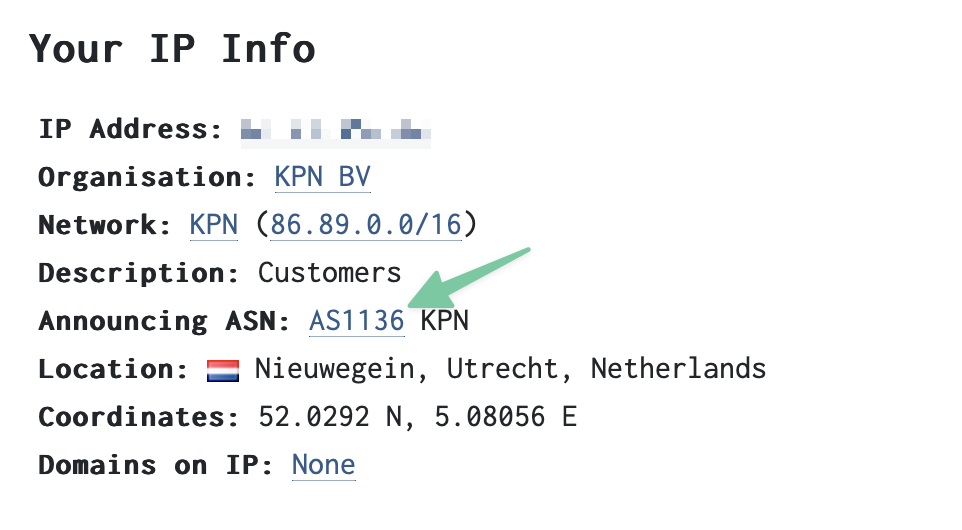
Another way to get and ASN for your desired provider is to look up their IPblocks. I do this with a site from Nirsoft, https://www.nirsoft.net/countryip/nl.html. Here with the IPblocks for The Netherlands. If you want to have the ASN for a provider called “Alma International B.V.” for example, you just take the first available IP-address in their block “2.16.0.1”.
-
Get the above script on your Edgerouter (ssh, scp, sftp) and place it in a directory of your likings. I place it in my $HOME on the router.
-
Name the script “create_networkgroup_asn.sh”
-
Make sure the script is executable:
chmod +x ./create_networkgroup_asn.sh -
Run the script (in this example for Alma International B.V., i.e., AS20940):
./create_networkgroup_asn.sh AS20940 -
Execute the following commands after the script has run.
configure . ./nwgs.sh commit save exit
A note
These network-groups are considerably smaller, I don’t really notice any extra boottime of the router.
What is next?
Now you have your network-group called “AS20940” (for this example) in the Edgerouter. You can use like it like any other resource in a firewall rule. You can now allow this network-group through your firewall and block all others that are not in this group (so allow only this provider to your webserver or whatever). Or you can block this network-group from your webserver and allow all other providers. It’s up to you.
📝
✏️ Uittredingsdatum
Met pijn in haar vingertoppen hangt Emma aan de gevel van de lokale kerk in haar dorp. Uiteraard in het donker, ze mag niet gezien worden door de lokale wetsdienaar. Ze heeft dit al vaak gedaan. Niet alleen hier hangend aan de kerk, maar ook aan andere hoge en gevaarlijke objecten. Het beoefenen van parkour zit al 12 jaar in haar bloed vanaf haar 15de. Het jaar dat ze leerde over haar uittredingsdatum op haar geboorteakte. Zoals bij alle kinderen op die leeftijd wordt die datum dan ceremonieel in de kerk bekend gemaakt. Het maakt het kind direct bewust van de keuzes die gemaakt moeten worden en het pad dat gevolgd moet worden in het tijdsbestek op aarde.
Niemand weet hoe laat het zal gebeuren en op welke wijze op die bewuste datum. Dat is in de handen van God, maar de datum staat vast. Iets om naar toe te leven en te werken. De kinderen die leren dat ze maar een beperkte tijd op aarde hebben, moeten vaak intensief begeleid worden. In sommige gevallen tot mentale problemen aan toe. Vanaf het moment dat Emma wist wat haar uittredingsdatum was, voelde het voor haar als een bevrijding. Ze kon haar tijd gaan indelen, plannen maken, haar leven uitstippelen. Welke dingen deed ze niet en welke dingen deed ze juist wel? Het besef kwam al snel dat haar keuzes en handelen niet tot haar dood zouden leiden, althans niet tot een dag voor die bewuste datum. Fatalistisch is ze nooit geworden hierdoor, maar het maakte wel dat ze koos de meer extreme sporten en hobbies uit te oefenen. Met bijbehorende ziekenhuisopnames uiteraard. Maar doodsangsten hebben haar ouders nooit gehad.
Vrienden maken was soms lastig. Vooral als ze haar datum met een potentiële levenspartner uitwisselde en waarvan bleek dat zijn datum erg verschilde met die van haar. Dat maakte het vaak tot een korte amoureuze relatie, maar nooit tot die bestendige relatie die ze zocht. Dit heeft haar wel getekend door de jaren heen. Het maakte dat ze zich alleen voelde. Natuurlijk was er de warme band met haar ouders en vriendinnen, maar dat was toch anders. Die vriendschapsbanden met vriendinnen waren vaak wel diepe en innige verstandhoudingen, gezien de tijd die er dan bleek te zijn als de data werden uitgewisseld.
Emma haar datum is morgen, morgen zal er een einde komen naar haar tijd. Daarom hangt ze nu voor de laatste keer aan de gevel, de gevel van de kerk die ze al zo vaak beklommen had. Deze dag, voor middernacht, kan ze dat nog ongestraft doen. Wanneer ze met een mooie salto afspringt van de richel aan kerkmuur, denkt ze aan morgen. Ze heeft met een aantal vriendinnen afgesproken. Ze wil er geen heisa van maken. Het moet een mooie dag worden. Wat ze morgen gaat doen met die vriendinnen weet ze eigenlijk nog niet zo goed. Moet ze haar hart volgen en gaan bungee-jumpen of parachutespringen? Of wordt het een gezellige, maar misschien fatale high tea? 📚📝
✏️ Zeevisser
Met de zilte zeewind door onze haren staken we de zeedijk bij Borssele over. Lopend uiteraard want tante had de auto geparkeerd onderaan de dijk. De zon was zo fel en zo heet dat het asfalt gesmolten was en de zolen van onze schoenen bleven plakken aan de zwarte ondergrond. We gingen het strand op, daar wilde je zijn als kind. Rennen op het strand en het liefst ook beestjes vangen. Want als kleine jongen uit de Betuwe hadden we die mooie kwalletjes en krabbetjes niet in de boomgaarden.
Het strand van Borssele voorzag in een voor ons grote en handige attractie in dat opzicht. Een soort wildwaterbaan over het strand waar je alleen maar je schepnetje in hoefde te houden om de mooiste creaties uit de zee te vangen. Dat ze wat suf waren door de klappen van de koelwaterpompen van de kerncentrale dat deerde niet als jonge zeevisser. We stonden tussen de grote zeemeeuwen aan de rand van de stroom die ook hun slag sloegen. Best indrukwekkend wanneer die zeemeeuwen duidelijk maakten dat ze ook een plaats hadden langs deze fastfood van zeedelicatessen.
’s Avonds zaten de gevangen krabbetjes allemaal in miniatuur zeeaquaria op het balkon van het appartement van mijn tante. Ieder in zijn eigen Tupperwarebakje, want daar grossierde mijn tante dan weer in. Velen van hen, als niet allemaal, hebben hun laatste rustplaats in de tuin van het appartementencomplex gevonden.
Jaren later vertelde mijn tante dat je het strand niet meer zou herkennen. De kerncentrale stond er uiteraard nog maar het strand zou opgeslokt zijn. Niet door de zee, maar door de groter wordende energievraag. Ik weet het niet, ik ben er nooit meer wezen kijken. Zou ook niet meer weten waar we parkeerden. Dat zie je natuurlijk ook niet zo goed vanaf de achterbank tussen de schepnetten en de plastic bakjes. ✏️🗺️🌱
✏️Duik horloge
De slagen van de klok in de kerktoren gaven aan dat ik opnieuw te laat voor het avondeten zou zijn. Klokkijken was nog geen van mijn basisbekwaamheden in die tijd. Ik had van mijn ouders wel een mooi duikhorloge gekregen. Daar zat zo’n handige ring op die moeders op vijf uur draaide, zodat ik kon zien wanneer ik moest gaan rennen. Maar ja, als je aan het voetballen bent in de tuin achter het gemeentehuis en je bent aan het winnen, dan helpt zo’n duikhorloge ook niet om vijf uur.
Ik rende onder de kerktoren door, langs de gracht, zo door de poort naar huis. Ik wist dat moeders niet met open armen klaar zou staan. Dit was al de zoveelste keer namelijk. En op tijd thuis voor het eten was een norm die gehaald moest worden bij ons thuis. Mijn vader was diabeet en in die dagen was discipline en aardappelen wegen het enige voor hem waarmee hij controle hield. En die discipline werd ook van mij verwacht, van een jonge voetballer met duikhorloge.
Het eten smaakte goed, al was moeders wel op oorlogspad met me. Er werd niet veel gezegd aan tafel. Ik wist ook al welke penalty ik tegen zou gaan krijgen. In de tijd tussen het bidden na het eten en de enkele reis slaapkamer, kreeg ik nog even een opfrisser van het duikhorloge. Geslagen werd er nooit, maar een eenzame opsluiting was er geregeld voor me.
Want voetballen doe je namelijk met genopte schoenen en niet met een deel van een duikuitrusting. Vader werd nooit kwaad, hij was ook een voetballer. Hij snapte me wel. Hij zou me waarschijnlijk ook eerder een wedstrijdklok gegeven hebben dan een duikhorloge.
Het slaapkamerraam gaf een prima uitzicht op de buurt en ik droomde alweer het volgende duel in de tuin achter het gemeentehuis. ✏️⚽︎📖
✏️ Papa’s Goede Werk
Hij kon alles horen, maar durfde zijn ogen niet te openen. Liggende in de kast onder de trap hoort hij de soldaten schreeuwen. Zijn moeder heeft de grootste moeite om ze buiten te houden. Plots hoort hij haar gillen.
‘Als papa eens hier zou zijn,’ fluistert de kleine Aleksandr in zichzelf. Hij balt zijn kleine knuistjes. Mama heeft hem duidelijk verteld dat hij, hoe dan ook, onder de trap moest blijven. Papa doet goed werk voor Oekraïne, was hem verteld. Wat papa precies deed, wist de kleine man niet. Maar het zou niet lang meer duren of papa zou thuiskomen.
Hij had tegen zijn moeder gezegd dat als hij later groot zou zijn, hij ook dat goede werk van papa wilde doen. Voor Oekraïne, net als papa. Maar Aleksandr hoopte wel dat dan de oorlog voorbij zou zijn.
Plots gaat de deur van de kast met een ferme zwaai open. Mama staat in de deuropening. ‘Alles is weer rustig, Aleksandr,’ zegt ze en probeert het trillen van haar stem te verbergen. Haar haren zien er verwilderd uit, haar kleren lijken in de plooi getrokken. Door de zwarte vegen op haar wangen ziet de kleine man sporen van tranen lopen, maar mama tovert een lach op haar gezicht.
Aleksandr zijn knuistjes ontspannen, ‘Als papa eens hier zou zijn,’ denkt hij. 📝🎨
✏️ Altijd een beproeving
Afgepeigerd na het sporten dekt Frits in de keuken. Na het verlies van zijn eerste 93 kilo nog altijd een terging. Zijn vrouw vergt het uiterste van hem. 🏃♂️🏃♀️🏃
✏️ Tuinslangtrots
Na vijf jaar loopt hij toevallig door haar straat. Terwijl ze rustig de tuin water staat te geven, pikt ze een glimp op van hem door de struiken aan de rand van haar perceel. Ze voelt de woede weer, de vernedering van die zak hooi.
Wanneer hij in zijn dandy outfit voorbij komt aan haar voortuin, draait ze zich expres naar hem toe. De straal van de tuinslang recht in gezicht van de nieuwe vlam aan zijn zijde.
‘Hé, jij hier?’, lacht ze. Wat opgelucht dat hij niet de getroffene is, zegt hij, ‘Joh, wat leuk je weer te zien. Weer eens afspreken?’
Terwijl de inmiddels gebluste vlam haar make-up fatsoeneert en hij geen aandacht voor haar heeft, weet ze, ‘Eens een zak hooi, altijd een zak hooi.’ En blust hem ook nog even na met de tuinslang. ✏️🌱💬
✏️ Glorieuze kampeermomenten
Hij wilde eigenlijk niet naar buiten op een avond als deze. De regen stroomde langs het tentdoek naar beneden. Met hoge nood toch haastend naar de campingwc. Hij kon ternauwernood de toiletrol droog houden. Met het water in zijn sportschoenen en onder hoge druk, was dan toch de verlossing nabij.
Kak, campingpas vergeten. 🏕️⛺️📝✏️
✏️ Driemaal Scheepsrecht
Ze stond al meer dan een half uur voor zijn deur. In de regen, maar dat deerde haar niet. Haar blik gefocust op de knop van de deurbel. Ze twijfelde of ze zou gaan drukken. Of het nog gepast was om te drukken. Ze wist dat ze dit keer te ver was gegaan. Ze wist dat het nu mogelijk te laat was. Te laat om nog excuus aan te bieden.
Weer keek ze vertwijfeld naar de deurbel. Haar anders zo mooie haren zagen er niet uit door de regen. Wat zou ze moeten zeggen? Hoe zou hij reageren? Het was al de derde keer geweest, maar toch kwam ze altijd terug naar hem.
De andere keren was het onwetendheid. Dommigheid. Onoplettendheid. Maar nu had ze beter moeten weten, beter voorbereid moeten zijn op de valkuilen. Het ging allemaal ook zo snel. Alsof ze er ingeluisd was. Maar ze besefte dat ze zelf had moeten opletten.
Als ze uiteindelijk omdraait en weg wil rennen, komt hij met een ferme pas de tuin ingelopen. ‘Ik kom net bij de slager vandaan’, roept hij. Snel beschermt hij haar voor de regen en opent de voordeur. ‘Schatje’, zegt hij, ‘als we morgen weer kunnen barbecueën zal ik dan maar de hamburgers doen? Driemaal laten verbranden is scheepsrecht hé’. 📝✏️
📟Pretty Good Privacy with keybase.io
2020 : This post is obsolete since Keybase was acquired by Zoom.
Used PGP back in the 90s just because it was possible. The internet was growing, and my friends and I liked to experiment in those days with all that we found on the internet. PGP was one of those things. We had great fun back then, but never used it again the following decades.
But a few days ago I saw a talk from Mike Godwin about privacy on the internet. He pointed out https://www.keybase.io/ in his talk as a start to set up PGP and ways to communicate with him.
I got curious again about PGP and Keybase.io, and I had no trouble at all to quickly set up an account and a PGP key pair with these guys. They have nice low-level tooling to encrypt and decrypt messages on their website.
What I wanted again was a way to have my email encrypted, like I had back then in the 90s when my friends and I played around with it. I found a great tutorial on the internet from the Electronic Frontier Foundation on how to het PGP setup on a MAC.
It is set up with Thunderbird Mail Client and within this tutorial they let you generate a PGP key pair with GnuPG. Which will do the job, but I wanted to set it up with my Keybase.io key pair. I needed to export my Keybase.io key pair to the GnuPG keychain.
Reading the docs at their site, I found out that I could pull my Keybase.io Key to GnuPG keychain by the following command.
keybase pgp pull-private --all
But this gave me the following error
▶ ERROR .keys doesn't exist
Just following this workaround to fix it.
Make sure that in the linked device to your keybase.io account, the option “Forbid account changes from the website” is disabled in the advanced settings. By disabling this option, more possibles are enabled on the keybase.io site. One of them is to export your private key.
After you have disabled this option on your device, go to the website of keybase.io and visit your profile page. And find an “edit” link behind the signature of the public key. Select the edit link, and you get the option to export your private key.
Copy the key and save it to your desktop. Use the following command to import the private key to the GnuPG keychain. Where “Private_Key.asc” holds your private key.
gpg2 --allow-secret-key-import --import Private_Key.asc
Also save your public key to your desktop. And import this one with the following command. Where “Public_Key.asc” holds your public key.
gpg2 --import Public_Key.asc
This serie of actions will replace the generation of a PGP key pair with GnuPG and import your keybase.io key pair.
Don’t forget to delete your private key from your desktop.
Make sure it’s cleaned up!
Now finish the thunderbird tutorial from EFF with the keybase.io key pair. And you have a PGP mailclient setup with keybase.io. There is also a nice integration possible with the macOS MAIL.APP with https://gpgtools.org, but this requires a paid license. Whatever suites your needs.
Ok, I hope this helps you.
Find me here on keybase.io and if you like to send me a PGP encrypted email, here is my public key. But this one can also be found on keybase.io.
Oh, and don’t forget to send me your public key or your keybase.io profile page, so I can download your public key if you shared it. If you want a message back, of course ;-).
Use the following command to pull in my public key in your GnuPG keychain. And a follow on keybase.io.
curl https://keybase.io/marc0janssen/pgp_keys.asc | gpg2 --import

keybase follow marc0janssen
Thanks for reading! 📝🖋️
👨🏽💻Starbit Commander
This game is my first coding for The BBC Micro:bit. The goal is to have a nice target to practice and learn microPython on this device. But first I wanted to have a go on the makeCode editor for the Micro:bit.
I made this simple little game. Flying a spaceship through an astroid field. Occasionally, a blinking power-up will appear. This gives the advance to survive an astroid collision. Catching two power-ups will destroy all astroids in the field. Astroids will speed up in time, but slow down if a double power-up is acquired.
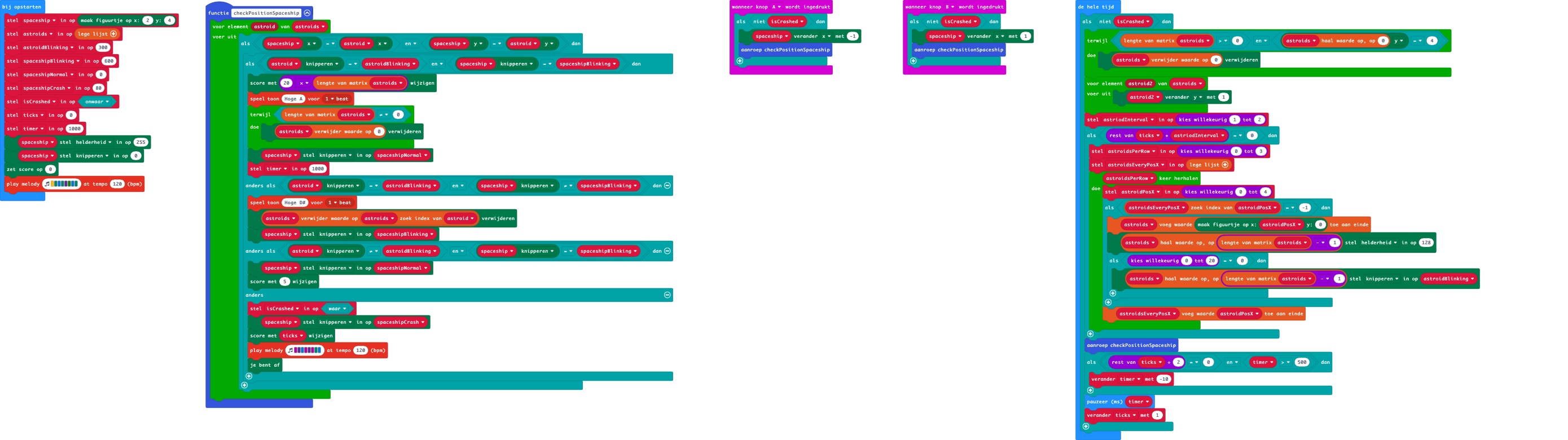
To edit this repository in MakeCode.
- Open https://makecode.microbit.org/
- Click Import and select Import URL
- Paste https://github.com/marc0janssen/starbit-commander
- Select import
🎮🖖🏻🚀
👨🏽💻Simple Simon Says
The game Simon in the late 70s was maybe the first “computer” game I played. Well, perhaps it was a real computer. I was just a kid, but the game always stayed with me. In my mind, that is. The game was from a friend, and we played it for ages.
Now with the Micro:bit I wanted to revive this memory and use the Micro:bit as a vehicle to get this to life again. Below is my make code attempt. I used a Micro:bit version2 for this.
This Simon listens to Button A, Button B, Button C (the touch sensitive logo), Button D (= Button A+B).
It was fun to create and a good way to set me off with the possibilities of the Micro:bit…
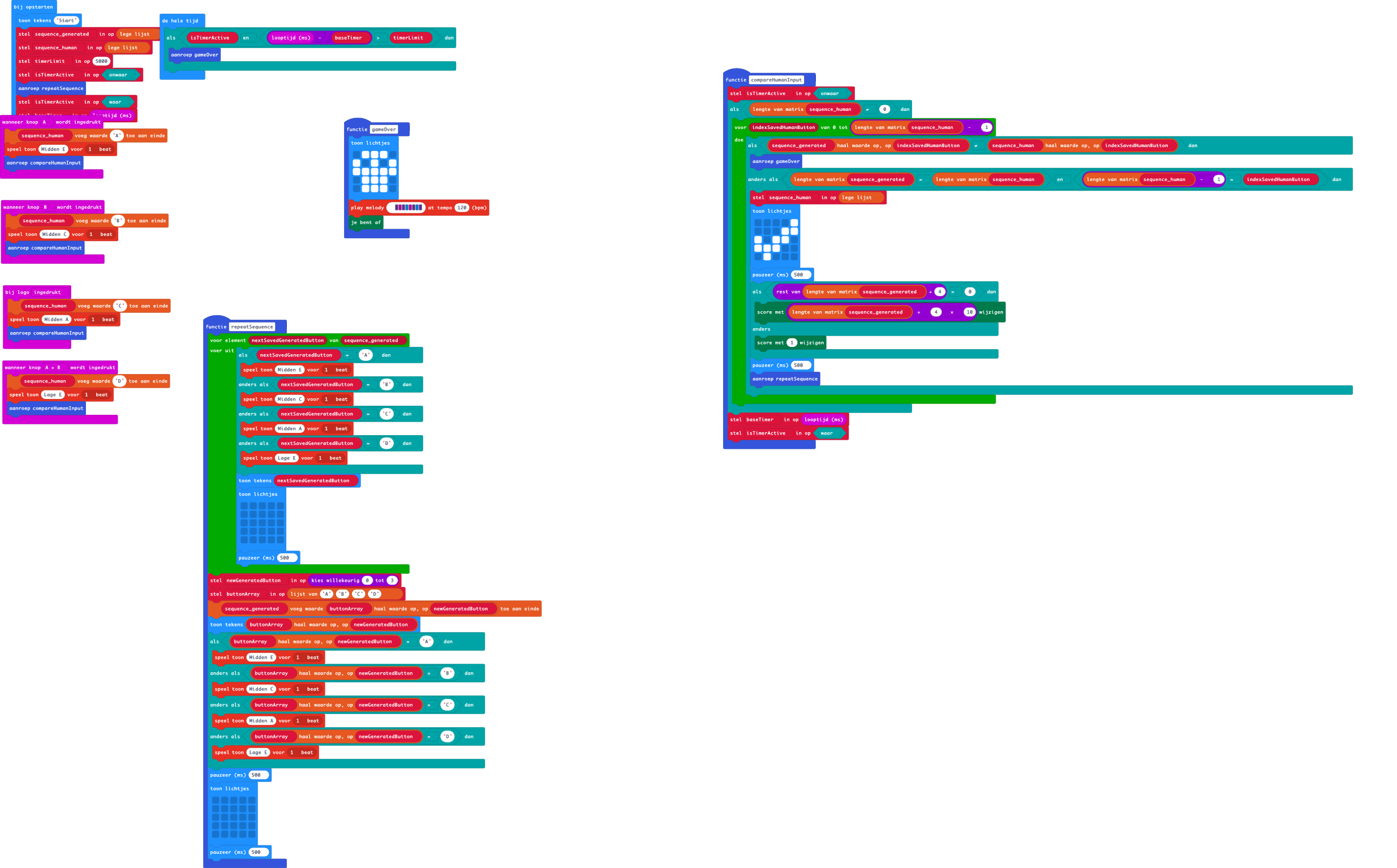
To edit this repository in MakeCode:
- open https://makecode.microbit.org/
- Click Import and select Import URL
- paste https://github.com/marc0janssen/simple-simon-says
- select import 🎮📝🖌️
✏️ Kleine baguette met gerookte kipfilet
Weer op weg naar huis met de trein. En elke dag staat hij daar bij de ingang, of uitgang zoals je wilt, van het station. Dagelijks groet hij de mensen die hun trein moeten halen, in de hoop dat hij een groet terug krijgt. En natuurlijk een kleine bijdrage. Velen lopen hem voorbij en groeten niet eens.
Ik zie hem bijna dagelijks, hij groet me dan ook bijna dagelijks. En dagelijks wordt de sociale druk voor mij groter. Hij lijkt elke dag vriendelijker te worden. Hij spreekt me altijd beleefd aan en nooit opdringerig. Hij is gewoon vriendelijk en dat is zijn sterke kant.
Ik heb me voorgenomen om geen geld te geven. Dat is niet helpen. Ja, van de wal in de sloot. Nu ben ik niet mijn broeders hoeder, maar ik wil ook dat hij geen rotzooi koopt. Het is natuurlijk een groot vooroordeel wat ik hiermee heb. Alsof iedere persoon die op deze manier in zijn dagelijkse onderhoud moet voorzien, rotzooi koopt van het geld dat hij ophaalt.
Maar ik heb toch besloten om hem in natura voor zijn vriendelijke groet te betalen. Ook vandaag groet hij me weer beleefd en ik ben ook weer vriendelijk naar hem. Maar in plaats van direct naar perron vijf te lopen, neem ik even de afslag naar de Hema op het station. Ik kijk naar alle lekkere broodjes en schat in dat deze heer vandaag wel eens zin zou kunnen hebben in een kleine baguette met gerookte kipfilet.
Als ik terugloop naar de ingang van het station en hem aanspreek, kijkt me hij enigszins verbaasd, maar erg dankbaar aan. Ik zeg hem dat ik hoop dat het broodje hem zal smaken en wens hem een fijne dag. Hij dankt me beleefd en allerhartelijkst. Je ziet het geluk in zijn ogen. Het geeft me een goed gevoel. Ik maak uiteindelijk nog een kort praatje met hem, maar dan wil ik toch echt mijn trein halen op perron vijf.
Ik heb deze man nog jaren gegroet bij het station en vaker een broodje gekocht. We zijn nu sinds corona 3 jaar verder, ik ben weinig meer op het station. Het is nu thuiswerken. Ik denk nog wel eens aan hem. En of hij nu nog steeds bij het station staat. En of hij soms nog wel eens wat te eten krijgt van iemand. Of eigenlijk hoop ik dat hij zelf dat broodje kan gaan kopen, want dat zou ik deze vriendelijke man van harte toewensen. 🍞✏️🗺️
✏️ Een inclusieve Kerst
Nadine zat wat beteuterd aan het kerstontbijt op eerste Kerstdag. Er stond van alles op tafel. Kaiserbroodjes, een kerststol, de meest uiteenlopende vleeswaren en 1001 soorten zoetwaren.
Maar haar aandacht was gevestigd op de gingerbread poppen en een grote ontbijtkoek. “Zeg mam”, zei Nadine, “zijn we nu wel gemberneutraal voor de Kerst?” 🍞🎨📝
✏️ Keuzebegoocheling
Ze woonde al 15 jaar bij deze familie. Ze had nooit ergens anders gewoond en wilde ook nergens anders naartoe. Ze was bij hen gaan wonen direct na haar geboorte, zo’n acht weken later. Ze had vaak gehoord, “We hebben haar gekozen omdat ze de enige grijze was”.
Maar ze wist wel beter. Een eeuwenoude onwetendheid onder de mensen, maar een goed bewaard geheim door haar soort. Iets wat van generatie op generatie wordt overgedragen. Haar soort hield de mythe voor hun eigen gewin in stand. Ze moesten boven alles niet op de tenen van hun dienaren trappen. Zeker geen slapende honden wakker maken.
Na 15 jaar en vele fijne momenten met catnip verder, heeft ze nooit echt spijt gehad van haar keuze. Ze bleef de indruk wekken dat haar dienaren haar gekozen hadden. Iets wat de mensen geloven, maar wat haar soort al eeuwen lang wist af te dwingen. 🐈🐱✏️
✏️ Explosieve vrienden
In tegenstelling tot andere illegalen, word je in bepaalde kringen met open armen ontvangen. We zouden er samen, op die speciale avond, een knallend feest van maken. Alleen op dat ene verraderlijke moment veranderde de kameraadschap. Het kostte me mijn rechterhand. Je verdween ineens en plotsklaps, maar liet veel verdriet en spijt achter. 📝✏️
✏️ Groen adoptiekind
Zo’n tien jaar is hij daar opgegroeid, tussen zijn familie, zijn vrienden en soortgenoten. Maar vandaag wordt hij geadopteerd, losgemaakt van zijn roots. Op een speciale avond met hem, wil iedereen hem zien. Hij hoort er voor nu echt bij. In deze periode, een speciaal plekje in ieders hart. Voor twee weken dan. 📝,✏️